Vermeer's Lens: AR Drawing1.3
Publisher Description
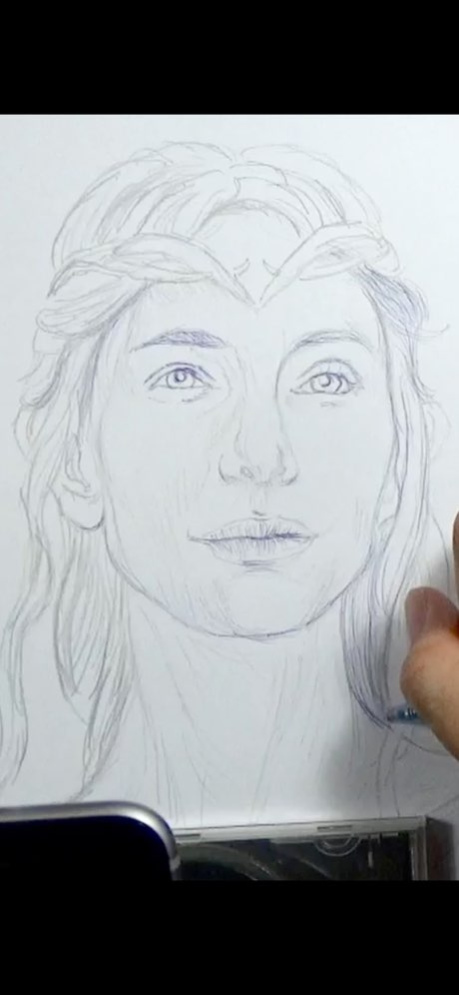


* A quick sketch of Galadriel (played by Cate Blanchett) from "The Lord Of The Rings" film series; done using Vermeer's Lens, a 2B pencil and blue ballpoint pen on an A4 printer paper.
◉ Vermeer's Lens is no ordinary drawing app. It is a drawing app that helps you make real sketches on paper.
◉ Vermeer's Lens is an augmented reality drawing app that works like an AR projector. It projects any photo you've selected from your photo library on any paper or sketch books you prefer drawing on.
◉ Vermeer's Lens allows you to trace out the images you want to draw before shading. But it is more than a tracing tool, as it also allows you to capture areas of different tones and highlights - achieving a more lifelike picture.
◉ Vermeer's Lens is a great tool for portrait drawing.
◉ Vermeer's Lens can also be used in short drawing/sketching practices for beginners.
◉ Vermeer's Lens enables even beginners to make stunning drawings.
◉ Through its precise algorithms, what is traditionally difficult, such as portraits, can now be done without the need of construction lines.
◉ This app works on most phones without using Apple's ARKit which can only run on newer high performance chips. It's a simple effective tool for a simple hobby.
*** See "Developer's website" below for a video demo
*** A Youtube channel (see "Developer's website") is set up to provide you with examples of Vermeer's Lens in action. Content will be regularly uploaded so long as there are people interested in this app.
*** This app works on most phones without using Apple's ARKit which can only run on newer high performance chips. It is simple, reliable and stable.
________________________________________________________
How it works :
> a photo is chosen from your photo library and “projected” over the paper to draw on.
> This projection is achieved by imaging the paper on the phone screen, and overlaying the translucent photo onto it.
> With the phone held in a phone-holder, you can use its screen as a lens, through which you trace out the photo onto the paper.
> Phone can be tilted and rotated to the angle most comfortable to you, while Vermeer’s Lens transforms the photo to match the perspective of the paper.
> Not just the outlines, even the different subtle tones and contours of a face could be captured, to get that 3-D effect.
> Opacity of the overlaying photo could be adjusted to allow close comparison between your drawing and the photo.
> The overlaying photo responds to on-screen gesture: you could move, scale and rotate the photo during sketching.
> A zoom option allows you to zoom in on your drawing for delicate pencil work.
in addition :
> A Vermeer’s Lens channel is also created on youtube to provide our users with additional "instructions & tutorials"on the use of this app to create art (videos updated regularly).
This is linked directly to the app via the “Demo” button.
> You can email us for support/feedback directly via the “Contact Us” button on the main menu of the app. Or leave a message (go to the “about” tab) on our youtube channel (see “Developer’s website” below).
For more info and demo:
> See “Developer’s website” below
Bug fixes and performance improvements.
About Vermeer's Lens: AR Drawing
The company that develops Vermeer's Lens: AR Drawing is zhiyang law. The latest version released by its developer is 1.3. This app was rated by 1 users of our site and has an average rating of 1.5.
To install Vermeer's Lens: AR Drawing on your iOS device, just click the green Continue To App button above to start the installation process. The app is listed on our website since 2021-09-22 and was downloaded 224 times. We have already checked if the download link is safe, however for your own protection we recommend that you scan the downloaded app with your antivirus. Your antivirus may detect the Vermeer's Lens: AR Drawing as malware if the download link is broken.
How to install Vermeer's Lens: AR Drawing on your iOS device:
- Click on the Continue To App button on our website. This will redirect you to the App Store.
- Once the Vermeer's Lens: AR Drawing is shown in the iTunes listing of your iOS device, you can start its download and installation. Tap on the GET button to the right of the app to start downloading it.
- If you are not logged-in the iOS appstore app, you'll be prompted for your your Apple ID and/or password.
- After Vermeer's Lens: AR Drawing is downloaded, you'll see an INSTALL button to the right. Tap on it to start the actual installation of the iOS app.
- Once installation is finished you can tap on the OPEN button to start it. Its icon will also be added to your device home screen.
Program Details
System requirements
Download information
Pricing
Version History
version 1.3
posted on 2021-09-22
Sep 22, 2021 Version 1.3
Bug fixes and performance improvements.
version 1.3
posted on 2021-09-22
Bug fixes and performance improvements.
version 1.2.9
posted on 2021-08-22
Aug 22, 2021 Version 1.2.9
Bug fixes and performance improvements.
version 1.2.8
posted on 2021-08-02
Aug 2, 2021 Version 1.2.8
Bug fixes and performance improvements.
version 1.2.7
posted on 2021-07-22
Jul 22, 2021 Version 1.2.7
Bug fixes and performance improvements.
version 1.2.6
posted on 2021-07-02
Jul 2, 2021 Version 1.2.6
Bugs fixed.
version 1.2.5
posted on 2021-06-10
Jun 10, 2021 Version 1.2.5
Bugs fixed.
version 1.2.4
posted on 2021-03-13
Mar 13, 2021 Version 1.2.4
Bugs fixed.
version 1.2.3
posted on 2020-11-24
Nov 24, 2020 Version 1.2.3
Bugs fixed.
version 1.2.2
posted on 2020-06-27
Jun 27, 2020 Version 1.2.2
Bugs fixed.
